MCSL-216 · MCA_NEW Semester 1 · Viva prep

DAA and Web Design Lab viva

Understand your three programs, see every recent exam question solved, then test yourself. Tap the next to any word for a plain explanation.

Term-end practical
2 hours · 50 marks
Viva in that exam
10 marks
Assignment viva
20 marks, compulsory

Your three programs

Most viva marks come from explaining these. Each one starts with the answer, then a picture you can play with, then the code if you want it.

Program 1 · Section 1, Q1

Job scheduling: keep the total waiting as small as possible

One server, four jobs. Serve the shortest job first, because everyone behind a job has to wait for it.Order 1 → 2 → 5 → 10Total 46Average 11.5GreedyO(n log n)

Picture one photocopy machine and four people in line, needing 3, 7, 4 and 8 minutes. If the 8-minute person goes first, all three others wait those 8 minutes. If the 3-minute person goes first, the others wait only 3. Short jobs first means less waiting for everyone.

See it: switch the order and watch the waiting

Serve
Job 1 needs 3
3
3
Job 2 needs 4
waits 34
7
Job 5 needs 7
waits 77
14
Job 10 needs 8
waits 148
22

Time in system = 3 + 7 + 14 + 22 = 46 · total waiting 24

Shortest first46
As given49
Longest first64

How the program works

  1. Store each job's number and service time in a struct.
  2. Sort the jobs by service time, smallest first (the greedy choice). The program uses insertion sort.
  3. Walk through the sorted jobs, keeping a running clock. Each job's finish time is its time in the system.
  4. Add up the finish times: 3 + 7 + 14 + 22 = 46, and divide by 4 for the average, 11.5.
Why it is always the best order: the total is T = n·t₁ + (n−1)·t₂ + … + 1·tₙ. The first job's time is counted 4 times and the last job's only once, so the smallest time should go first. With a fast sort the whole thing is O(n log n).
Show the program and what each part does
struct job { int id; int service; };

/* insertion sort: each job slides left past longer jobs */
void sort_by_service(struct job a[], int n) {
    int i, j; struct job key;
    for (i = 1; i < n; i++) {
        key = a[i]; j = i - 1;
        while (j >= 0 && a[j].service > key.service) {
            a[j + 1] = a[j]; j--;
        }
        a[j + 1] = key;
    }
}

int main(void) {
    struct job jobs[] = { {1,3}, {5,7}, {2,4}, {10,8} };
    int n = sizeof(jobs) / sizeof(jobs[0]);
    int i, finish = 0, total = 0;
    sort_by_service(jobs, n);
    for (i = 0; i < n; i++) {
        finish += jobs[i].service;   /* this job leaves now */
        total  += finish;
    }
    printf("Total = %d, Average = %.2f\n", total, (float) total / n);
    return 0;
}
sizeof(jobs)/sizeof(jobs[0])
Bytes of the whole array ÷ bytes of one job = the number of jobs, 4.
finish += …
The running clock: each job leaves when its own service ends.
(float) total / n
A type cast, so 46 / 4 gives 11.50 instead of 11.
Say it in 30 seconds

There is one server and four jobs. A job's time in the system is when it finishes. Since every job waits for the ones ahead of it, I used the greedy rule of shortest service time first. I sort by service time with insertion sort and add up the finishing times. The order is 1, 2, 5, 10 with a total of 46, which is the minimum: the order as given gives 49, and longest first gives 64. With a proper sort it is O(n log n).
Program 3 · Section 2, Q1 · every exam's Q2

Hostel booking form that saves to a database

The browser checks the form, the server checks it again, and a prepared statement saves it safely.JavaScript validationPHP + MySQLPrepared statementReset clears all

Think of a hotel reception. The form is the registration card. JavaScript is the receptionist glancing at it ("you forgot your name"). PHP is the manager in the back office checking it again, because cards can arrive without passing reception. MySQL is the register book.

See it: follow one submission

Try
1 · booking.htmlThe user fills the form and clicks Submit.
2 · validateForm()JavaScript checks every field in the browser.
3 · book.phpPHP checks again on the server and prepares the INSERT.
4 · MySQLThe row is saved in the booking table.

Pick a case to see where the data goes.

The three files

  1. schema.sql creates the booking table, with one column per field and an auto-numbered primary key.
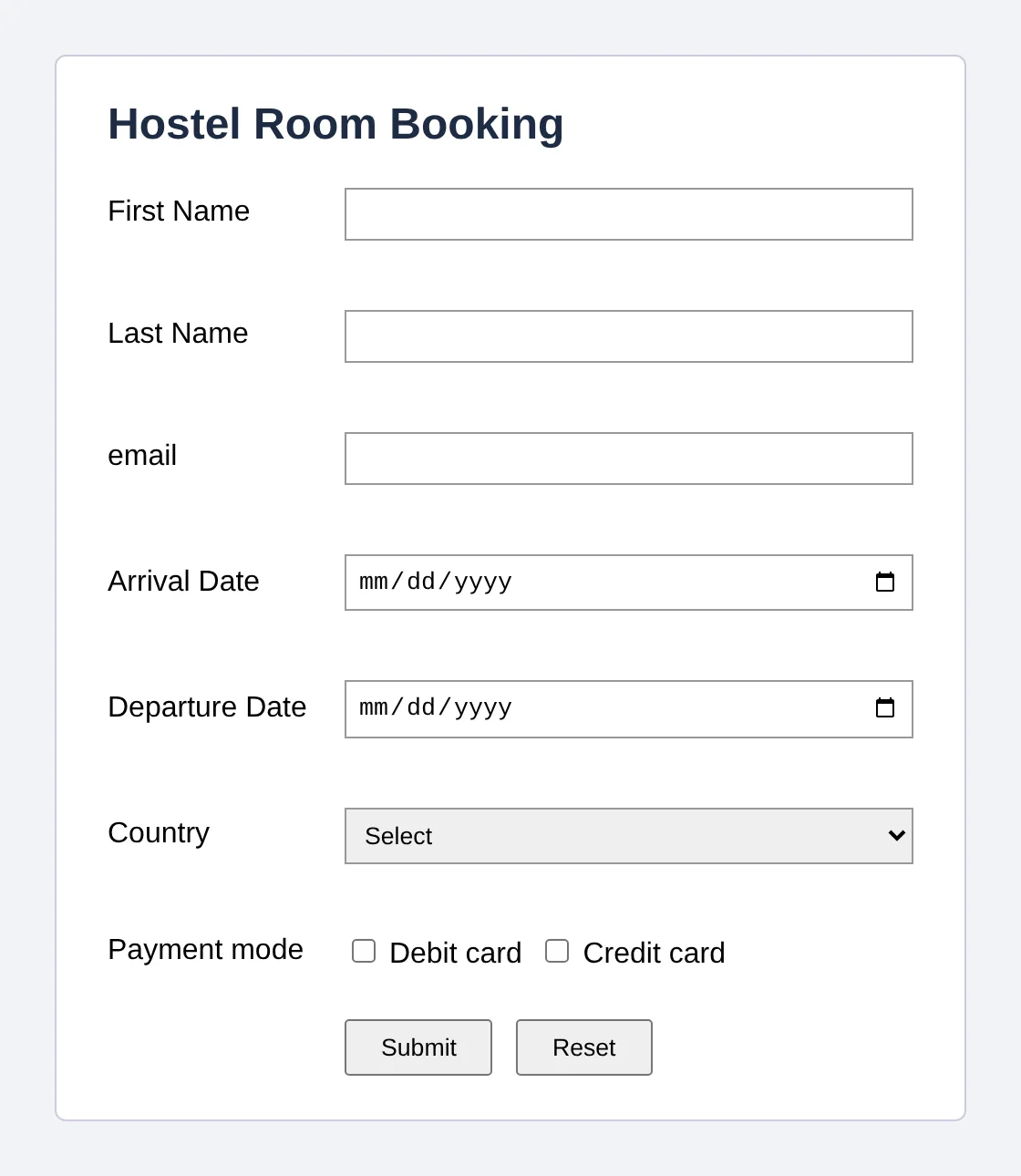
  2. booking.html is the form (HTML), with a country drop-down, two payment checkboxes, Submit and Reset. validateForm() checks every field using the DOM and a regular expression.
  3. book.php receives the data by POST, checks it again, and saves it with a prepared statement, so SQL injection can't happen.
Hostel Room Booking form with empty fields, a Country drop-down, Debit card and Credit card checkboxes, and Submit and Reset buttons
The form when opened.
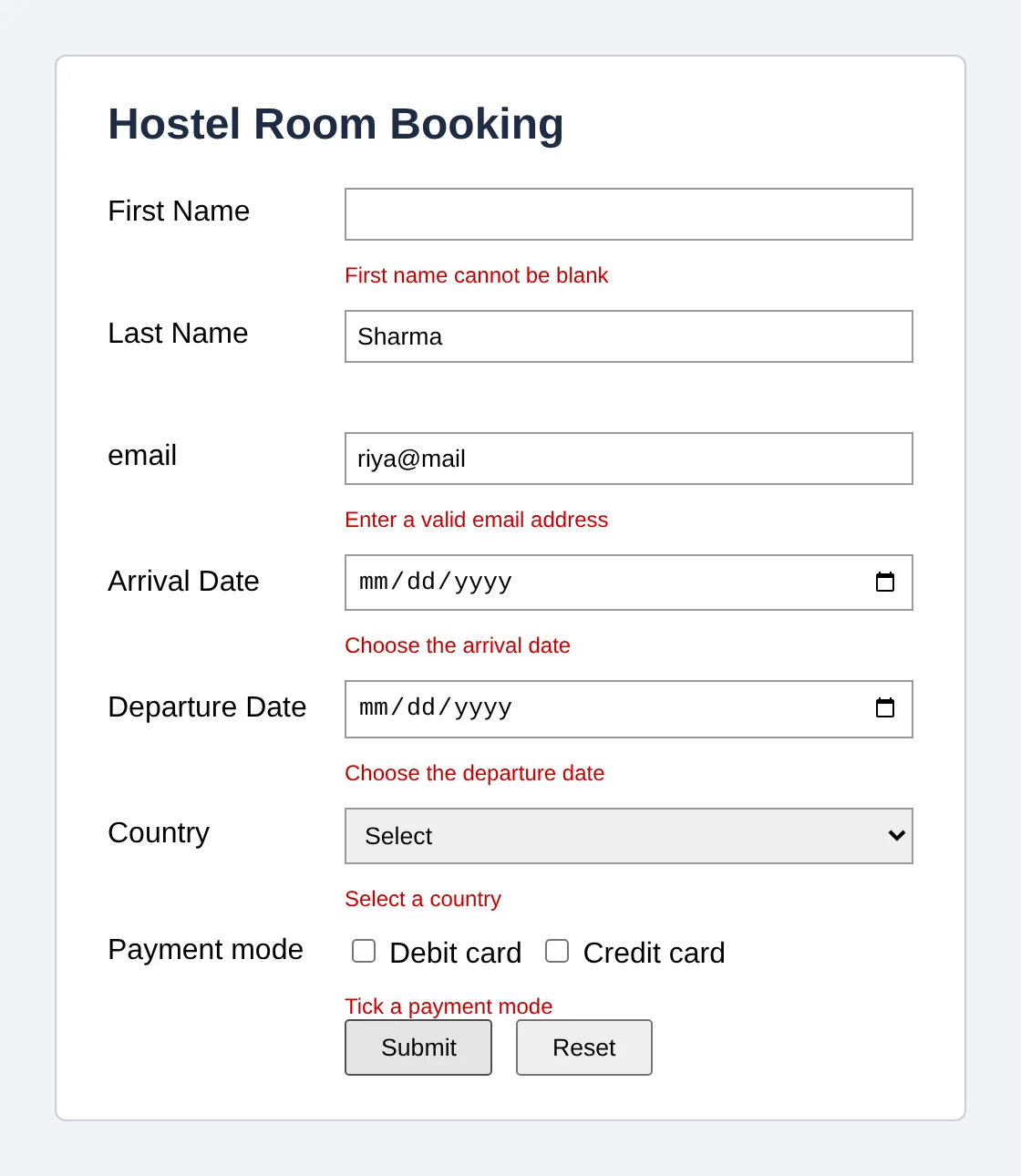
The same form showing a red error message under each invalid field
Submit with blank or wrong fields: a red message under each, and nothing is sent.
Show the code: table, validation and saving
CREATE TABLE booking (
  booking_id     INT AUTO_INCREMENT PRIMARY KEY,
  first_name     VARCHAR(50)  NOT NULL,
  last_name      VARCHAR(50)  NOT NULL,
  email          VARCHAR(100) NOT NULL,
  arrival_date   DATE NOT NULL,
  departure_date DATE NOT NULL,
  country        VARCHAR(50)  NOT NULL,
  payment_mode   VARCHAR(20)  NOT NULL,
  booked_on      TIMESTAMP DEFAULT CURRENT_TIMESTAMP
);
function validateForm() {
  var ok = true, f = document.booking;
  if (f.fname.value.trim() === "")
    ok = show("fnameErr", "First name cannot be blank");
  else if (!/^[A-Za-z ]+$/.test(f.fname.value))
    ok = show("fnameErr", "Use letters only");
  /* same for last name, email, both dates, country, payment */
  return ok;          /* false stops the form being sent */
}
$sql  = 'INSERT INTO booking (first_name, last_name, email,
          arrival_date, departure_date, country, payment_mode)
          VALUES (?, ?, ?, ?, ?, ?, ?)';
$stmt = $db->prepare($sql);         // the SQL is fixed first
$stmt->execute([$fname, $lname, $email,
                $arrival, $departure, $country, $payment]);
echo "Booking saved. Your booking ID is " . $db->lastInsertId();
return validateForm()
If the function returns false, the browser cancels the submit.
trim()
Removes spaces at both ends, so a field of only spaces counts as blank.
onlyOne(box)
The question asked for checkboxes, so ticking one payment box unticks the other.
clearErrors()
Runs on Reset, so the old red messages go too.

Run it with XAMPP: start Apache and MySQL, put the files in htdocs, and open localhost/booking.html.

Say it in 30 seconds

The form has all the asked fields, a drop-down for country and checkboxes for payment. JavaScript validates every field on submit and shows a red message under any blank or wrong field, and only valid data is posted to book.php. PHP checks again, because JavaScript can be switched off, and then inserts the row into MySQL with a PDO prepared statement, so SQL injection is not possible. Reset clears all fields and messages.